Lock Down Your Backups: Object Lock Is Coming to JetBackup 5
The threat level facing the hosting industry has changed. AI is helping cybercriminals improve phishing, automate social engineering, research vulnerabilities, and launch attacks faster and at a much greater scale.
For hosting providers, one successful attack can compromise far more than a single website. If an attacker gains root access, they may have the keys to the entire castle, including customer data, production systems, administrator accounts, and the backups needed for recovery.
JetBackup is actively working to protect your backups from the threats of today and the attacks coming next. That is why Object Lock backup support is coming soon to JetBackup 5.
Lock Your Backups Against Deletion
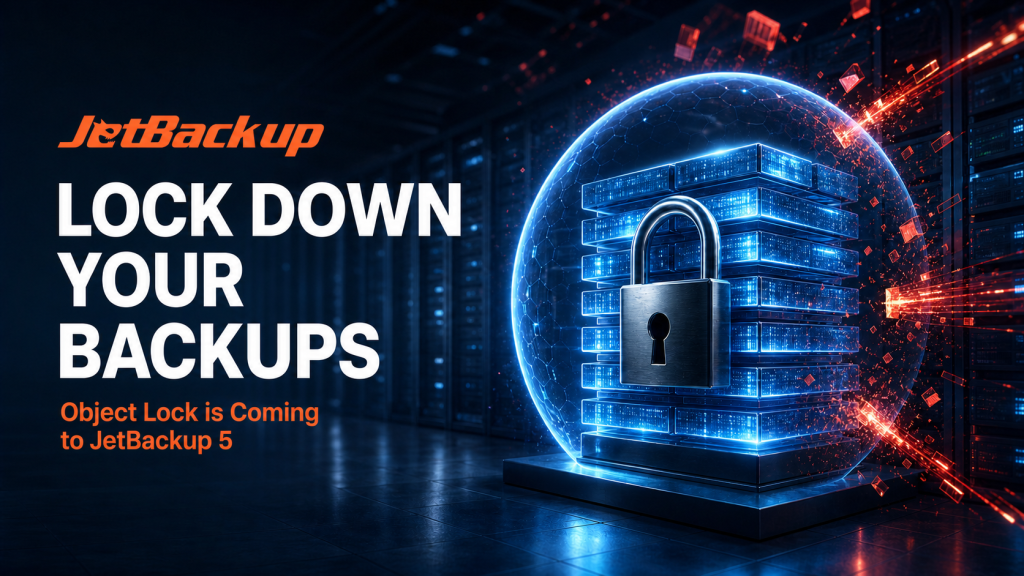
JetBackup Object Lock will allow customers to create immutable backups on supported storage destinations for a custom retention period. While the lock is active, protected backup versions cannot be modified, overwritten, or deleted.
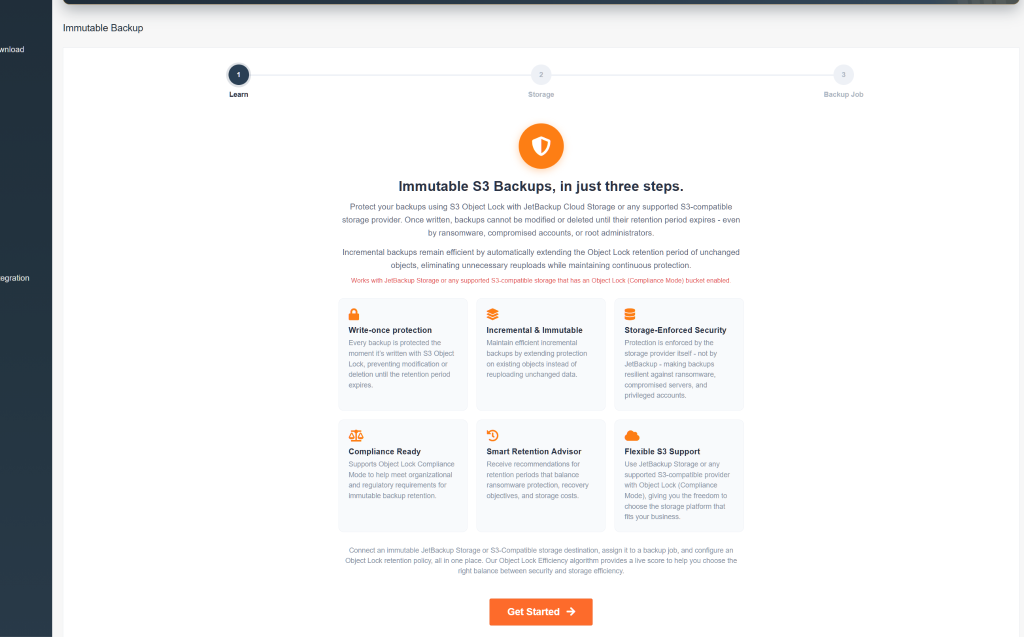
With Object Lock correctly configured, nobody can delete the protected backup version before its retention period expires. Not you, not your administrators, not an attacker using compromised credentials, and not even the root user of the storage account.
Object Lock protection is enforced at the storage level. Even if another layer of security fails, it can preserve the recovery points your business and customers depend on.
Why Object Lock Matters Now
Two-factor authentication remains an important part of JetBackup security, but account protection is only one layer. Hosting providers must also prepare for software vulnerabilities, stolen credentials, malicious insiders, and attacks that successfully reach privileged access.
Attackers understand that backups are your path to recovery. If they can delete those backups before encrypting production systems, they can turn a security incident into permanent data loss and place far more pressure on the victim to pay a ransom.
A backup that a compromised administrator account can delete may not provide the protection you think it does. Object Lock helps close this gap by making selected backup versions immutable for the retention period you choose.
CISA recommends maintaining encrypted and immutable backup data that cannot be altered or deleted during a ransomware incident. (CISA ransomware guidance)
AI Is Accelerating Existing Cyber Threats
AI did not create cybercrime, but it is making existing attack methods faster, more convincing, and easier to scale. Attackers can use AI to create personalized phishing messages, translate campaigns into multiple languages, research targets, process technical information, and adapt existing tools.
This does not mean AI can automatically compromise every server. It means attackers can complete many of their existing tasks more efficiently. Less experienced criminals can access capabilities that once required greater technical knowledge, while skilled attackers can increase the speed and reach of their campaigns.
The 2025 ENISA Threat Landscape identified phishing and vulnerability exploitation as the two leading initial intrusion methods. It also found that AI is increasingly being used to improve phishing and automate social engineering. (ENISA Threat Landscape 2025)
For hosting providers, the message is clear. Attacks are accelerating, privileged access remains a high-value target, and backups must be protected even when another security layer has already failed.
What Is Object Lock?
Object Lock is a storage-level feature that helps prevent an object version from being modified or deleted for a defined period. It uses a write-once, read-many model, commonly known as WORM storage.
Once a backup object version is written and locked, its retention policy remains with it. The storage platform enforces that policy independently of the source server and backup application.
This is what makes Object Lock different from standard permissions. Permissions determine who is normally allowed to delete a backup. Object Lock determines whether the protected backup version can be deleted at all.
How JetBackup Object Lock Will Work
JetBackup Object Lock will allow you to select a retention period for backups written to supported object storage. The configured retention period determines how long each protected backup version must remain locked.
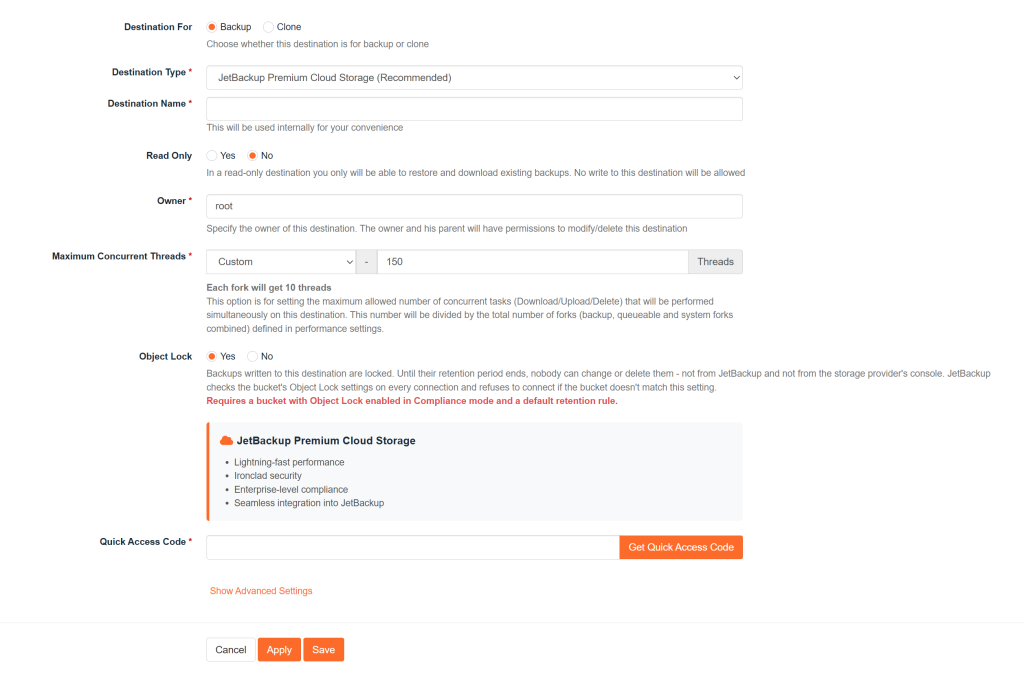
JetBackup will use Compliance Mode for Object Lock protection. We chose this approach because other modes can allow specially authorized administrators to bypass the lock. If those administrative credentials are compromised, that bypass could potentially be used by a bad actor to alter retention settings or delete protected data.
Compliance Mode removes that administrative bypass. A protected backup version cannot be overwritten or deleted before its retention period expires, and the retention period cannot be shortened. This protection applies even to the root user of the storage account.
Once your backup is locked, it remains locked for the retention period you selected.
Object Lock Retention Periods
A retention period specifies how long an object version must remain locked. Depending on the storage provider, this period may be configured in days or years.
While the retention period is active, the protected backup cannot be overwritten or deleted. When the period expires, the object version may become eligible for deletion based on your backup policies and the storage provider’s requirements.
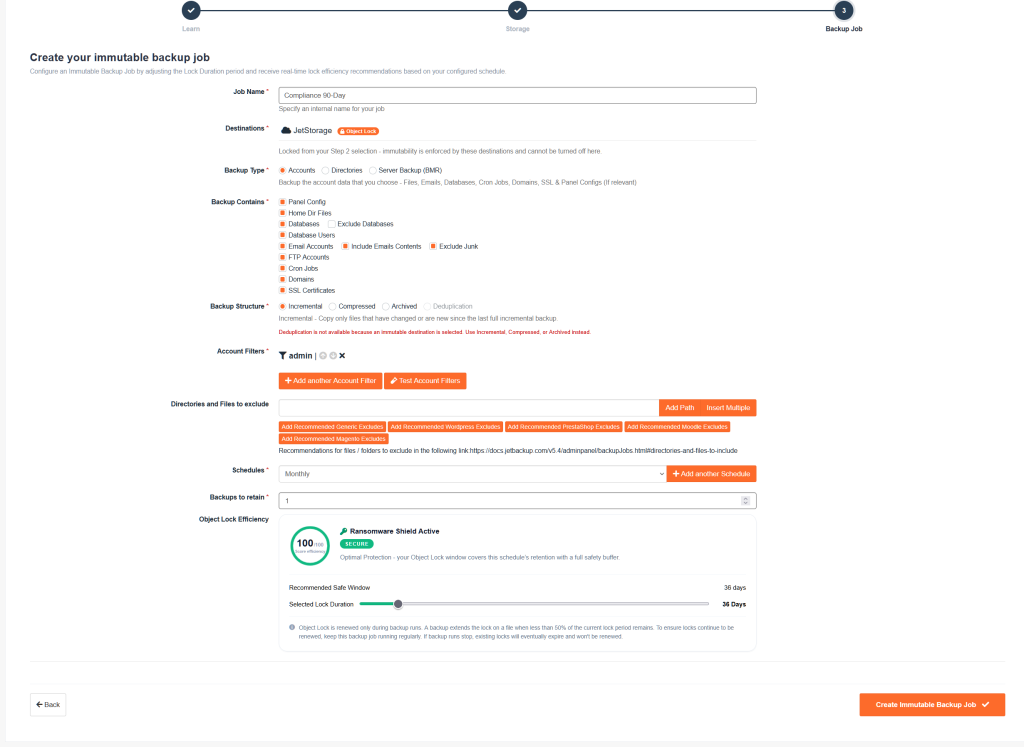
Longer retention periods provide a wider recovery window but also increase storage usage. Hosting providers should select a period that balances recovery objectives, security requirements, storage capacity, and cost.
Because an active retention period cannot be shortened, customers should carefully review their requirements before selecting how long backups will remain locked.
Object Lock Requirements
Object Lock requires compatible object storage and the correct bucket configuration. The exact requirements may vary by storage provider, but several key rules generally apply.
Bucket Versioning
Object Lock protects individual object versions, so bucket versioning must be enabled. If a new version of a backup object is created, the previous locked version retains its original protection.
This means different versions of the same object can have different retention periods and expiration dates.
Compatible Object Storage
The storage destination must support the Object Lock functionality required by JetBackup. Support will depend on the capabilities and implementation provided by each compatible destination.
Customers should confirm that Object Lock and bucket versioning are enabled and correctly configured before relying on the destination as part of their recovery strategy.
Careful Retention Planning
Locked backups continue to consume storage until they become eligible for deletion. A retention policy that is longer than necessary may increase storage costs, while a policy that is too short may not provide a sufficient recovery window.
Customers should consider recovery objectives, backup frequency, available storage, compliance requirements, and cost before choosing a retention period.
Protection Without an Administrative Bypass
JetBackup will use Compliance Mode because protected object versions cannot be overwritten or deleted during the active retention period, even by administrators or the root user of the storage account.
This prevents compromised administrator credentials, malicious insiders, and attackers with root access from using elevated permissions to remove protected backup versions.
Amazon S3 confirms that Object Lock uses a WORM model, requires versioning, and protects individual object versions. Its Compliance Mode prevents deletion by any user, including the AWS account’s root user, until the retention period expires. (Amazon S3 Object Lock documentation)
Object Lock Adds Another Layer of JetBackup Security
No single security feature can stop every attack. A strong backup strategy uses multiple layers to prevent unauthorized access, limit damage, preserve recovery data, and confirm that restoration works.
Two-factor authentication helps protect JetBackup accounts from stolen passwords. Access controls limit what users can do, monitoring can help identify suspicious activity, and regular restore testing confirms that backups can be recovered when they are needed.
Object Lock adds another critical layer by protecting the backup data itself. If an attacker compromises a server, administrator account, or connected credential, selected backup versions can remain locked at the storage level.
This changes the security question. It is no longer enough to ask whether a backup completed successfully. Hosting providers must also ask whether that backup can survive an attacker with root access.
Immutable Backups for Hosting Providers
Hosting providers carry a unique level of responsibility because one compromised system can affect many customers. Websites, databases, email, applications, and business operations may all depend on the ability to restore data quickly.
Immutable backups provide a protected recovery point when production systems and privileged accounts can no longer be trusted. They can help limit the impact of ransomware, administrative mistakes, compromised credentials, malicious insiders, and root-level attacks.
Object Lock does not replace patching, two-factor authentication, monitoring, or access controls. It protects the final layer that must remain available when another defense fails.
Object Lock Is Coming Soon to JetBackup 5
Cyberattacks are becoming faster and easier to scale as AI improves existing criminal tactics. Privileged accounts remain valuable targets, and backups will continue to be attacked because they are the foundation of recovery.
JetBackup is preparing for that future. Object Lock backup support is coming soon to JetBackup 5, giving hosting providers and administrators a powerful new way to protect immutable backups from ransomware, compromised credentials, accidental deletion, and root-level attacks.
Choose your retention period, lock your backups, and protect your ability to recover.
Frequently Asked Questions
What is JetBackup Object Lock?
JetBackup Object Lock is an upcoming JetBackup 5 capability that creates immutable backups on supported storage destinations. Protected object versions cannot be modified, overwritten, or deleted during their configured retention periods.
Why is JetBackup using Compliance Mode?
JetBackup is using Compliance Mode because other Object Lock modes can allow specially authorized administrators to bypass retention protection. If a privileged account is compromised, that bypass could potentially be used by a bad actor. Compliance Mode removes the administrative bypass and keeps protected backup versions locked until their retention periods expire.
What is an immutable backup?
An immutable backup is a protected backup version that cannot be modified, overwritten, or deleted during its active retention period. This helps ensure that a recovery point remains available even if an administrator account or source server is compromised.
Why do hosting providers need immutable backups?
Hosting providers manage large numbers of websites, databases, email accounts, and customer systems. A single privileged compromise can affect an entire server or its connected environment. Immutable backups help preserve clean recovery points even if an attacker gains administrator or root access.
Is AI increasing the cyber threat to hosting providers?
AI is helping attackers automate and improve existing techniques, including phishing, social engineering, target research, and vulnerability analysis. This can increase the speed, volume, and effectiveness of attacks against hosting infrastructure.
Can a hacker delete an Object Lock backup?
A backup version correctly protected by JetBackup Object Lock cannot be deleted through normal object-deletion operations before its retention period expires, even by the root user of the storage account.
Can an administrator delete a locked backup?
No. An administrator or root user cannot delete a protected backup version or shorten its retention period while the lock is active.
Does Object Lock protect backups from ransomware?
Object Lock can prevent ransomware or a compromised account from deleting and overwriting protected backup versions. It should be combined with two-factor authentication, access controls, monitoring, patching, and tested recovery procedures.
Can I choose how long my backups remain locked?
Object Lock supports custom retention periods based on the capabilities and configuration of the compatible storage provider. Customers should consider recovery requirements, storage capacity, costs, and regulatory obligations when choosing a retention period because an active lock cannot be shortened.
Does Object Lock require bucket versioning?
Yes. Object Lock applies protection to individual object versions and requires versioning to be enabled on the storage bucket.
When is Object Lock coming to JetBackup?
Object Lock backup support is planned for an upcoming version of JetBackup 5. Final availability, supported storage destinations, and functionality will depend on the JetBackup release and storage provider.
Will Object Lock be supported in JetBackup for WordPress?
Yes. Object Lock support is also planned for JetBackup for WordPress, bringing storage-level immutability and protection against ransomware and accidental deletion directly to standalone WordPress sites.
Subscribe to our newsletter
Get expert backup tips, the latest industry trends, and exclusive updates on all things JetBackup. Be the first to know—delivered straight to your inbox.